
Just as we’re used to installing apps on our phones to make them do the most disparate things, now we’re starting to install applications, or plugins more or less, into AI agents. And these apps and plugins currently take two different forms. One is skills, the other is MCP servers, which have since become MCP apps. Let’s talk briefly about the differences too.
What MCP is
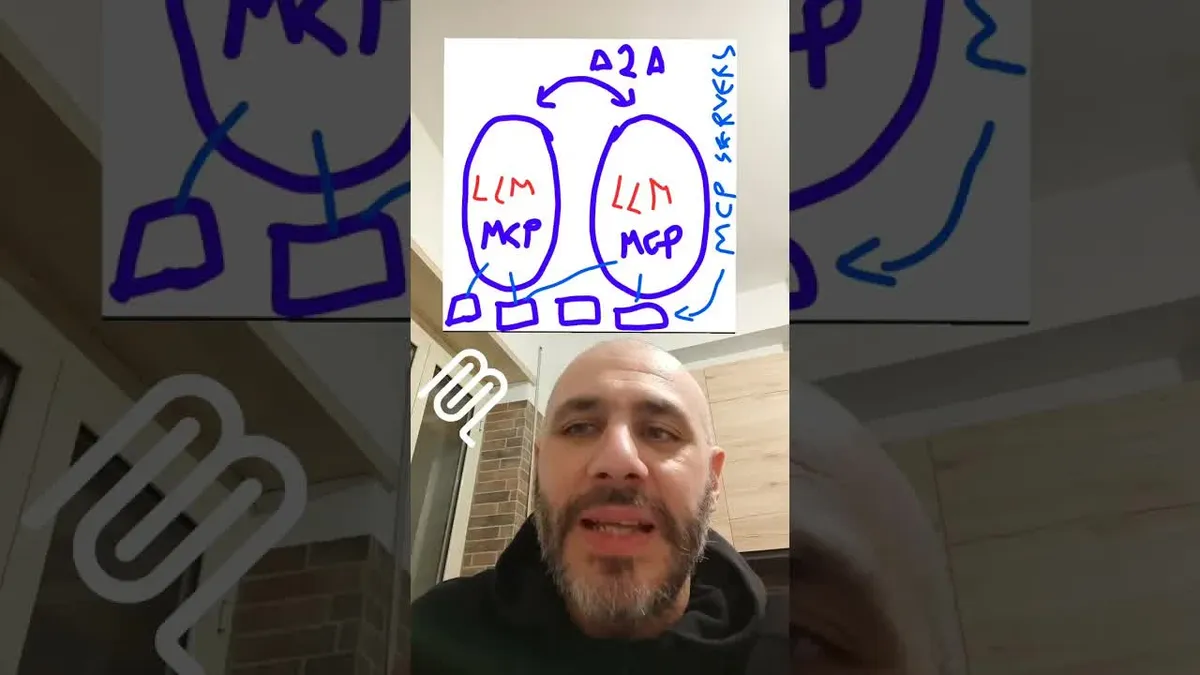
MCP is a protocol that comes from Anthropic, later donated to the Linux Foundation. What does it consist of? It consists of making functionality that lives on third-party services, machines somewhere else, available to your agent.
For example, I install the GitHub MCP server into my agent. From that moment on, when I tell my agent commit this code, download this thing, build this app with the CI, it does it. Or the Stripe MCP server for payments: I install it and I can ask my agent how much is in my account, what the latest transactions are, tell me if Peppino is in the address book because I owe him 20 euros, and so on.
The MCP server is built mainly for enterprise environments. It was actually appreciated very little by the general public, especially by non-nerds, and rightly so, because it’s a bit complicated. But it’s extremely elegant. It has problems that are on their way to being solved, which I won’t dwell on, but it really does let you create services available to agents so that the agents become composable. That means you talk to the MCP server, you connect it to Claude Code, to Codex, to the Cheshire Cat, to any agent. That’s the point.
A lot of people don’t get it: “no, but I set up the CI, I set up this, I set up that.” The point of MCP servers is that they’re services reachable over the network, for groups of people who use that service from possibly different agents, written in different languages, with different technologies.
The three MCP primitives
Every MCP server is made of three primitives essentially: prompts, tools, and resources.
Tools are operations that can be performed by the agent and are made available by the MCP server. For example, make a bank transfer: you tell the agent to make a transfer, the agent sees it has the Stripe MCP server available with the “make a transfer” tool, it launches it, and on the Stripe server that transfer actually goes through.
Resources are essentially attached files, a way to exchange files of any type, resources of any type. It’s a generalization of the concept of “here’s the document you need to summarize,” except with a resource the affair is much richer, because you can attach video, audio, pieces of graphical interface, anything. The concept of MCP resources is, I think, historically the most underrated and the most powerful of all. In fact the Cheshire Cat version 2 is heavily based on the concept of the resource in the MCP sense.
Prompts are ready-made prompts that let you launch workflows where that MCP server is already prepared, particularly good, and where the prompt mentions the tools it needs to use, which it contains itself, to do something. For example, in the Stripe MCP server you might find a ready-made prompt to analyze the transactions of the last few weeks and group them into categories. These prompts typically get launched directly from the agent’s graphical interface. Another primitive that’s poorly supported but very, very useful, and one that resembles the flows you find in skills.
What skills are
Skills are another proposal, standardized more or less. This one also starts at Anthropic, they’re the real great innovators of this historical period of AI. And these also serve to make your agent, your team’s agents, composable. But these are not services living on the network. A skill is simply a little folder with files inside it that you take and drop into the folder where your agent works.
Here I want to distinguish the chatbot conversation you find online, like ChatGPT or even Claude on the web, because with these agents it’s discussed differently, since they’re typically associated with projects, folders, files. These agents live with continuous access to a folder on your computer, or on a computer that’s somewhere else. The language model engine is placed in a context where there are files, and the agent, this software, besides using language, has a series of operations, the famous tools, to work on these files: read, write.
So it’s not the usual copy-paste, put something in ChatGPT, have it summarize, then recopy it and put it somewhere else. No, the agent does it all directly, because you put the documents it has to summarize inside these folders. It’s a CSV with the contacts a certain thing has to reach. Then you write another file with the rules for making quotes, you hook it up to email via MCP for example, and you can tell the agent something like “look, take Maria’s latest email and prepare a quote with this and this service and give her a 20% discount, then export it all to a PDF and put it there,” and it does it. And in my opinion a lot of people still haven’t realized the amount of stuff you can do.
A concrete skill example
Skills are little folders, little zips with these files inside, that you download into your agent in a specific folder, the skills folder. And after that the agent, instead of going onto the network to access resources, tools, and external workflows sitting on external services, has it right there, and they’re simple text files with what it has to do written inside.
Let me give you an example: the quotes skill. You make your quotes sheet, you put in the instructions for how you’re used to making quotes, and you carry that little folder around into all the agents you want making quotes the way you intend. And a large part of the sheet is literally written, it’s plain text, it’s you saying “look, when I make quotes I take this, then I do this, then I do this.” And the agent, when you say “let’s make a quote,” goes into the skills folder, sees there’s a skill for making quotes, reads the way you make quotes, and then does it. Got it? It’s a kind of secondary, transferable prompt, or as I say, composable.
Not only that: skills can also contain Python scripts, so you can also create slightly more violent automations. The fact remains that they’re not network services, they’re made mainly to live in your system.
So which one?
I’m having a lot of interesting discussions about this fight between MCP and skills, which maybe are for another video. But here’s the gist. If it’s about having network services reachable by groups of people, with permissions, authentication, serious stuff, MCP is currently the standard. If instead it’s your environment, your lab, your team, and you have workflows that need to be for you, that sit there and are reusable, skills are much more convenient to use.
So, skills and MCP servers.